A product feed in OpenAI’s product feed specification reaches ChatGPT in two ways. In OpenAI Ads Manager it makes products eligible for ads; during the beta, those products do not appear in organic ChatGPT conversations. For organic shopping results, merchants apply to OpenAI, and shopping in ChatGPT is currently live in the U.S. The specification has nine required fields, and items in Ads Manager expire after two weeks.
In ChatGPT, shoppers see products with images, prices and key details, and buy on the merchant’s own site or app. Product feeds, which merchants share with OpenAI, power how products appear in ChatGPT (new to feeds? Start with what a product feed is).
How it works: OpenAI's product feed
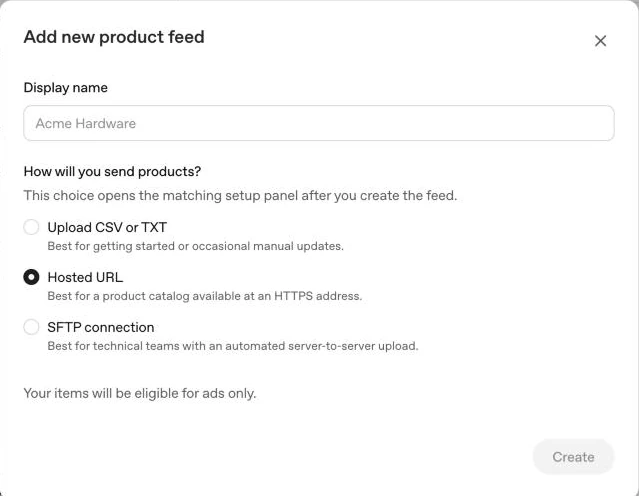
OpenAI publishes a product feed specification (the Agentic Commerce spec). For organic shopping results, onboarding product feeds in ChatGPT is currently available to approved partners, and access is by application. For stores on Shopify or Etsy, OpenAI says the catalog is already integrated and no application is required. In OpenAI Ads Manager, a feed is created under Tools → Feeds, with three ways to send products: a CSV or TXT upload, a hosted URL, or an SFTP connection. For SFTP, OpenAI's file upload overview names parquet as the preferred format, with jsonl.gz, csv.gz and tsv.gz also supported.
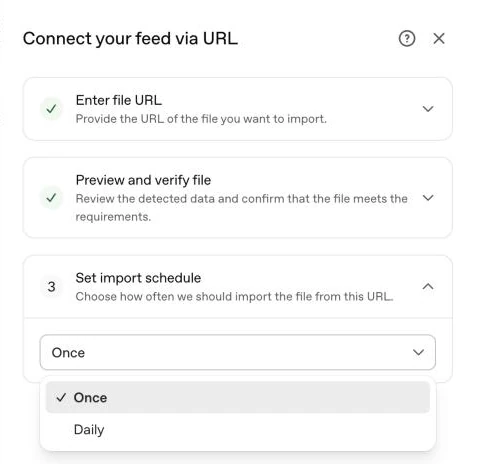
A hosted URL is imported once or daily, as set under Set import schedule; the default is Once. OpenAI processes every file in the SFTP root after uploads stop changing for a short time.
What the feed must contain
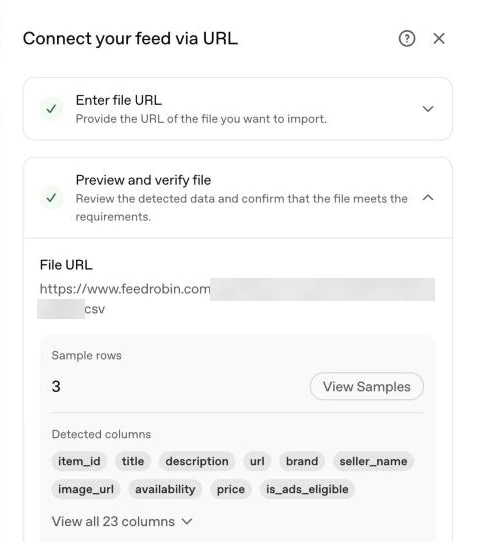
Nine fields are required for every product: item_id, title, description, url, brand, seller_name, image_url, availability (one of in_stock, out_of_stock, pre_order, backorder, unknown) and price in the form "79.99 EUR"; the spec says to aim for at most 150 characters in the title and 5,000 in the description. Variants carry a group_id linking them to the parent listing. is_eligible_search sets search eligibility and is true when omitted; is_eligible_checkout opts into checkout only when search eligibility is true and checkout is enabled for the integration, and is disabled when omitted. The nine required fields, and the optional fields for sale prices, images, variants and eligibility, are in the OpenAI product feed spec, field by field.
is_ads_eligible decides whether Ads can use a product. The spec says that when it is omitted or empty, Ads is disabled for the product unless a feed-level Ads default applies; feeds created in Ads Manager make products ads-eligible by default, unless a product is marked false. The flag is independent of search eligibility.
Submitting your catalog, step by step
1. Choose the route. ads.openai.com is OpenAI Ads, for ads in ChatGPT; after sign-up it leads into Ads Manager. chatgpt.com/merchants is a separate application to share product data and participate in shopping experiences in ChatGPT. The whole route, from the application to the daily upload, is in how to submit products to ChatGPT.
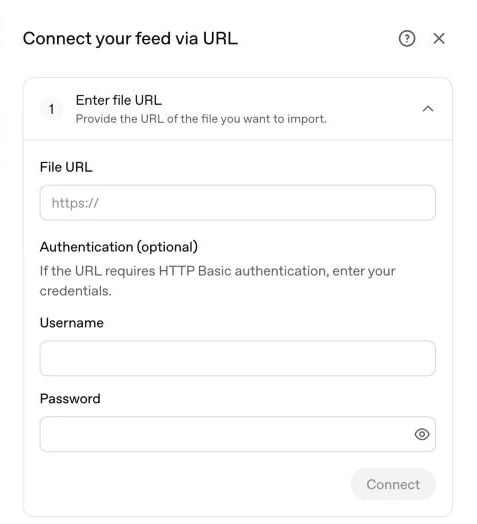
2. In Ads Manager, open Tools → Feeds → Create Feed and choose Upload CSV or TXT, Hosted URL or SFTP connection. For a hosted URL, enter the file’s address under File URL; Ads Manager previews the file and lists the columns it detected.
3. For a hosted URL, set Refresh frequency to Daily under Set import schedule; the default is Once.
Products expire after two weeks
In Ads Manager, items expire after two weeks. In the file upload route, a product missing from later processed snapshots is kept for up to 14 days, then removed.
OpenAI's Help Center recommends a hosted URL or automated SFTP uploads for that reason, and its file upload overview recommends full snapshots on a predictable cadence, at least daily, and moving to steady-state automation once validation is clean.
How FeedRobin handles it
Add the ChatGPT / OpenAI channel and FeedRobin renders your catalog with the field names of OpenAI's product feed spec, as JSONL and as CSV, from the same synced data as your Google and Meta feeds: availability mapped to OpenAI's values, prices written as an amount and a currency code, such as "79.99 EUR", and variants grouped under a shared group_id. Products without an image are left out of the file, and Validate now on the feed page shows how many and why. What changes between the Google format and OpenAI's is in reusing a Google Shopping feed for ChatGPT. The free feed check scores a feed URL or a Shopify store address, with no account; for a store address it does not run the barcode and identifier checks.
Every record also carries is_ads_eligible set to true, the value OpenAI's spec gives for products Ads should process. Variant rows carry listing_has_variations and a variant_dict with their option values, such as size or colour, when the store provides them.
Delivering the ChatGPT product feed to OpenAI
Hosted URL. Every feed has a link, and adding .csv to it serves the same feed as CSV. Copy the CSV link from the feed page, paste it in Ads Manager under Hosted URL → File URL, and set Refresh frequency to Daily. No username or password is needed.
Managed push. Enter the SFTP connection details OpenAI returns in the feed's Managed push section once, with their password or the private key for the SSH public key you sent OpenAI, and FeedRobin uploads the feed for you as a gzipped JSONL file. With a hosted URL, Ads Manager imports the file once or daily; managed push uploads every day at 04:15 UTC, and on Growth, Scale and Agency in four more windows a day when products have changed since the last push.
Each upload is written under a temporary name and then renamed to the target file name, and the SFTP password or private key is stored encrypted. After three push runs in a row fail, FeedRobin emails the address on the account with the reason, at most once every seven days.
The Download button on the feed page gives the feed as a CSV file, for an upload by hand under Upload CSV or TXT.
Sources
OpenAI Developers, Agentic Commerce: Products, Agentic Commerce: Overview, Agentic Commerce: Get Started and Ads: Product Feeds; OpenAI Help Center, Create Campaigns from Product Feeds; OpenAI Ads, Advertise in ChatGPT; OpenAI, Power product discovery in ChatGPT.